Free Estimate Template for Contractors
Here is a complete estimate template a plumber, HVAC tech, or electrician can use today. No email address, no signup — print it, download it, or make it your own.
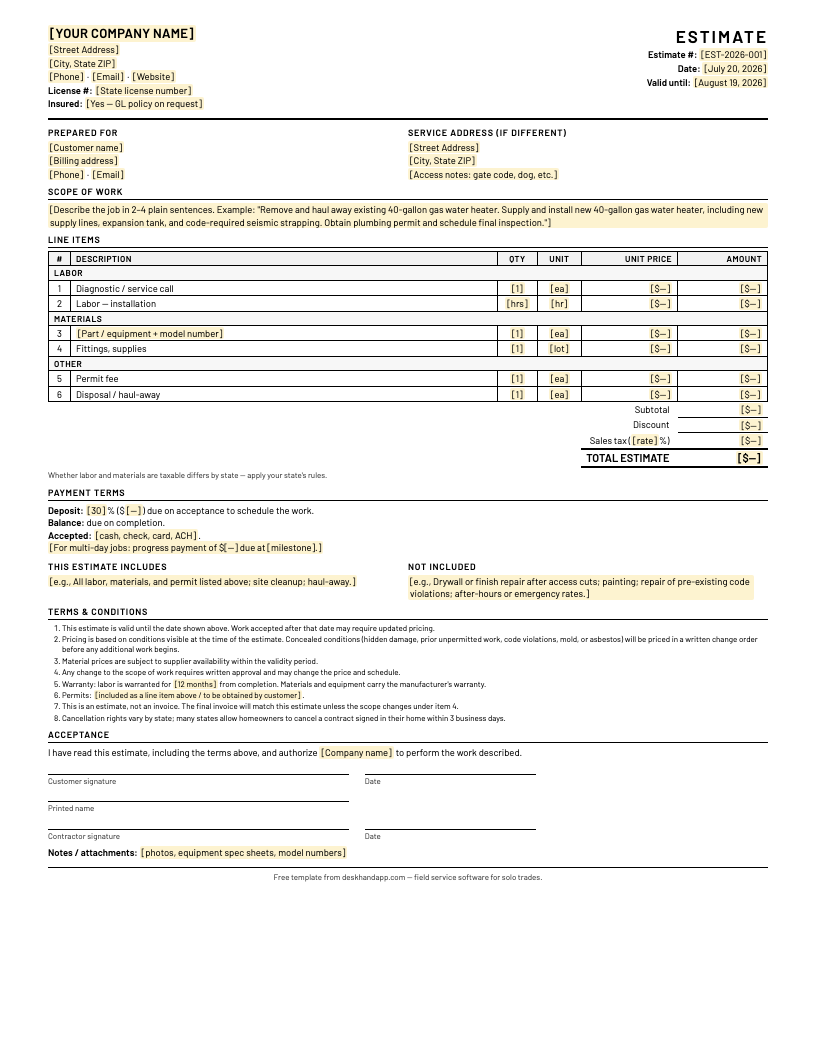
Contractor Estimate Template
Line items, labor and materials, totals, terms, and signature block.
PDF · 1 page · US LetterNo email required. Free to use in your business.
Running the paperwork is the easy part — Deskhand handles the office side for $49/month flat. Get early access:
How to use this template
Five steps take this from a blank form to an estimate that wins the job and protects your margin:
- Fill in your company info and license number once, and save it as your master. Company name, address, phone, email, license number, insurance line. Many states require the license number on estimates, and it's the fastest trust signal a homeowner gets. Do it once, keep the file, and start every estimate from that copy.
- Write the scope in sentences the customer understands. Two to four plain sentences describing what you'll remove, supply, install, and inspect. If a homeowner can read it back to you accurately, it's written right. Jargon in the scope is where disputes start.
- Separate labor and materials line items. The template groups them for you: labor rows, materials rows (with model numbers), and other costs like permits and haul-away. Customers trust itemized numbers, and your state's tax rules may treat labor and materials differently.
- Set the validity date and the deposit. The template defaults to 30 days of validity and a deposit due on acceptance. Both protect you: one against material price moves, the other against no-show customers holding a slot on your calendar.
- Get a signature and leave a copy. The acceptance block at the bottom is the whole point. A signed estimate with clear terms is the document that settles arguments before they start.
Example line items: plumbing
A typical 40-gallon gas water heater swap breaks out like this:
| Item | Group | Example |
|---|---|---|
| Labor — remove and install | Labor | 3 hrs at your hourly rate |
| 40-gal gas water heater + expansion tank | Materials | Include the model number |
| Plumbing permit | Other | At your local permit cost |
| Haul-away of old unit | Other | Flat disposal fee |
Example line items: HVAC
A condenser replacement usually itemizes into four lines:
| Item | Group | Example |
|---|---|---|
| Labor — removal, set, and startup | Labor | Hours at your rate |
| Condenser unit + line set flush | Materials | Include model and tonnage |
| Refrigerant charge | Materials | By the pound, at current cost |
| Mechanical permit | Other | At your local permit cost |
Example line items: electrical
A 200A panel upgrade typically comes down to three lines:
| Item | Group | Example |
|---|---|---|
| Labor — panel swap and terminations | Labor | Hours at your rate |
| 200A panel + breakers | Materials | Include panel model and breaker count |
| Electrical permit + inspection | Other | At your local permit cost |
What makes a good contractor estimate
Seven rules separate estimates that win work from estimates that sit unread:
- 1. Send it the same day — ideally before you leave the driveway. The contractor who gets a written number in front of the customer first usually wins. An estimate that arrives three days later is competing with someone else's signed acceptance.
- 2. Separate labor from materials. Itemized numbers build trust, some states tax labor and materials differently, and when a supplier raises prices mid-validity, a separated materials line is your documentation for why the number moved.
- 3. Put a validity date on every estimate. An open-ended estimate is donated margin: when material prices move and the customer accepts four months later, you're locked into last season's numbers. Thirty days is the standard default.
- 4. Write down what's NOT included. Scope creep and concealed-condition disputes are the margin killers in this business. The "not included" block — drywall repair after access cuts, pre-existing code violations, after-hours rates — is what keeps a $1,800 job from quietly becoming a $1,800 price for $2,600 of work.
- 5. Make it unmistakably yours. Your company name at the top, your license number, your direct phone. A generic-looking estimate reads like junk mail and gets treated like it. The customer should know within one second whose document they're holding.
- 6. Get a signature, not a verbal OK. "Yeah, go ahead" over the phone is zero evidence in a dispute. The signature block takes thirty seconds and turns your estimate into proof of what was agreed, by whom, and when.
- 7. Make the final invoice match the estimate. Estimate-invoice mismatch is the number one review killer in the trades. If the scope changed, that's what the written change order in the terms is for — the invoice should never be the first place a customer learns the price moved.
Estimate vs. quote vs. invoice
In the field these words get used interchangeably. On paper they mean different things:
- Estimate — an informed approximation of the cost, with conditions noted. It can move if documented conditions change, which is why the template's terms cover concealed conditions and change orders.
- Quote — a fixed-price offer. When a customer accepts a quote, you're committing to that number. Use the word deliberately.
- Invoice — the bill, issued after the work is done. It should match the accepted estimate unless a written change order says otherwise.
- Bid — mostly used for larger or competitive jobs where several contractors submit against the same spec.
In the field the words blur; what matters legally is the wording on the document itself. That's exactly why term 7 in the template says, in writing, "this is an estimate, not an invoice."
If you'd rather never fill out a template by hand again
We're building Deskhand, so read this section knowing that. This template works — but every estimate you write by hand gets retyped at least three times: into an invoice, into a calendar, and into QuickBooks. That retyping is where evenings go and where mismatches creep in.
Deskhand is being built for one- and two-person licensed trades in the US to close that loop: a quote built on your phone in about a minute — line items, a photo, e-signature approval by text — that becomes the scheduled job, the matching invoice, and the QuickBooks entry without retyping anything. Flat $49/month, everything included.
The honest part: Deskhand hasn't launched yet. The template above is yours either way — no email required, no catch. If the retyping problem sounds like your evenings, join the early access list — founding members lock the $49/month price for life.